How to Use a Pay Down Loan Calculator to Save Interest
By Sohaib Ibrahim · Published November 3, 2026
To pay a loan down faster, enter your current balance, interest rate and monthly payment into a pay down loan calculator, add an extra monthly amount or a one-time lump sum, and compare the new payoff date and total interest against your current schedule. On a $25,000 loan at 8% over 60 months, an extra $100 a month ends the loan 11 months early and saves about $1,090 in interest.
Your lender's statement shows only the required payment, so it never tells you what an extra $50 or $500 would do. Most people guess, send an odd amount, and never learn whether it moved the payoff date. Others open a calculator that asks for an email address or for inputs they can't find on their statement.
This guide walks you through four steps with one worked example. You will enter your loan details, test extra payments and lump sums, work backward from a target date, and make sure your lender applies the money to principal. We use the free Extra Mortgage Payment Calculator and Amortization Calculator from HomeLoanCalc.io, which need no signup. The same steps work in any pay off loan faster calculator you prefer.
Why a pay down calculator beats guessing
A pay down calculator shows the exact payoff date and interest total for any extra payment. You can't estimate that by hand, because interest is recalculated on a shrinking balance every month.
How extra payments cut interest
Each month your lender charges interest on what you still owe, roughly your balance times the annual rate divided by 12. An extra dollar goes straight to principal, so next month's interest is smaller. A bigger share of your regular payment then goes to principal as well.
That effect builds on itself, and early extra payments work the longest. A $2,000 lump sum in month one saves far more than the same $2,000 in the last year. The Extra Mortgage Payment Calculator shows this by comparing your original schedule against an accelerated one in two balance charts.
Every extra dollar of principal stops accruing interest from the month it lands.
What to have ready
Gather these five items before you open any tool:
- Current balance from your latest statement, not the original loan amount
- Annual interest rate (the note rate or APR on your loan)
- Regular monthly payment, principal and interest only
- Months remaining on the loan
- Prepayment penalty, if your loan agreement has one
Step 1. Enter your balance, rate and payment
Type your current balance, annual rate and regular payment into the calculator, then confirm that the baseline payoff date matches your statement. If the baseline is off, every savings figure after it is off too.
Fill in the inputs
HomeLoanCalc.io's Extra Mortgage Payment Calculator is free, needs no signup, and updates results as you type. It is built for mortgages and starts from your current loan balance. For a car or personal loan, the Amortization Calculator takes a loan amount, annual rate and term in years, and it uses the same fixed-rate math that lenders use.
Check the baseline
Compare the calculator's monthly payment and payoff date with your statement. A difference of a few dollars is normal, because results are planning estimates and your lender's figures can differ slightly. A bigger gap usually means one of two things: you entered the original balance instead of the current one, or the statement payment includes taxes and insurance. On a mortgage, enter principal and interest only.
If the baseline is wrong, every savings figure after it is wrong too.
Step 2. Test extra payments and lump sums
Add a fixed extra amount per month first, then try a one-time lump sum, and read two numbers: the new payoff time and the total interest saved. Our example is a $25,000 loan at 8% APR over 60 months. The payment is $506.91 and the total interest is about $5,415.
Try a monthly extra
Run a small extra amount, then a larger one, so you can see how fast the savings grow. The table shows the results, rounded to the nearest dollar.
| Scenario | Monthly payment | Payoff time | Total interest | Interest saved |
|---|---|---|---|---|
| Baseline | $506.91 | 60 months | $5,415 | $0 |
| Extra $100 a month | $606.91 | 49 months | $4,326 | $1,089 |
| Extra $200 a month | $706.91 | 41 months | $3,607 | $1,808 |
| $2,000 lump sum at the start | $506.91 | 55 months | $4,483 | $932 |
Doubling the extra payment saves about 66% more interest here, not 100% more. Returns shrink as the loan gets shorter, because less balance is left to charge interest on.
Try a lump sum
A $2,000 lump sum at the start saves about $932. The $100 monthly extra saves about $1,089, but it takes roughly $4,800 of extra payments over 48 months to do it. Per dollar, the lump sum saves about 47 cents of interest, and the monthly extra about 23 cents.
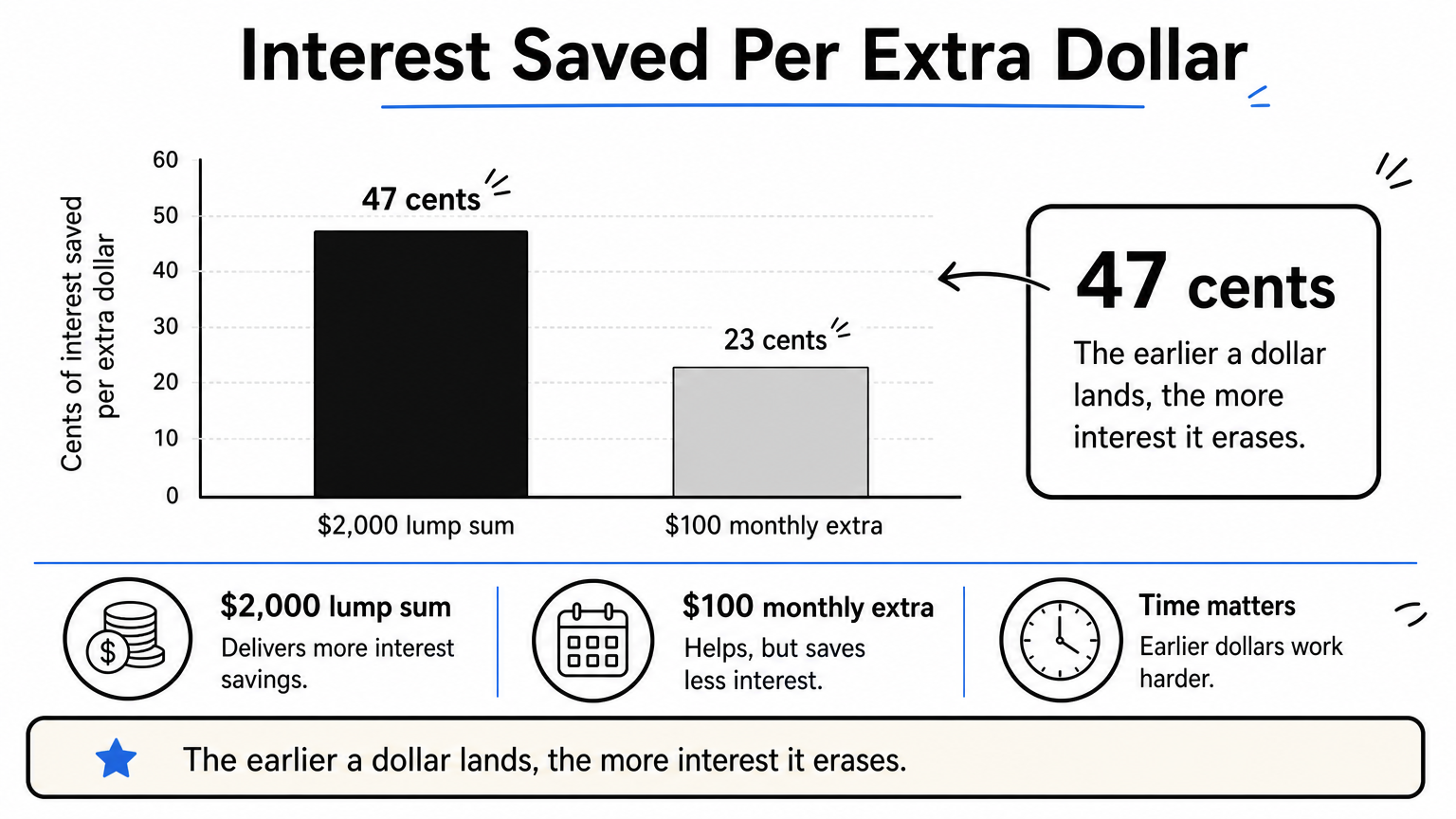
Test your own windfall, such as a tax refund or bonus, at different points in the loan. If your calculator lets you pick the month, you will see that the later a lump sum lands, the less it saves.
The earlier an extra dollar lands, the more interest it erases.
Step 3. Work backward from a target payoff date
To hit a specific payoff date, find the payment that clears your balance by then, and subtract your current payment. The difference is your required extra amount. Use this when your goal is a date, such as paying off a 30-year loan in 15 years.
Find the payment you need
Take a $400,000 loan at 7% over 30 years. The payment is about $2,661 a month and the total interest is about $558,000. To finish in 15 years, the payment becomes about $3,595, so you need roughly $934 extra every month. Interest falls to about $247,000, which is about $311,000 less. These figures assume a new loan, so on an existing one, enter your current balance and the months you want left.
The same method works for short goals. Paying off $10,000 in 6 months at 18% APR takes about $1,755 a month, including roughly $530 of interest. If that number is above your budget, lengthen the target until the payment fits.
Check the result by hand
You can verify any calculator with one formula. Use your monthly rate (annual rate divided by 12) and the payment you plan to make:
months = -ln(1 - (balance x monthly rate) / payment) / ln(1 + monthly rate)

Example: balance 25,000, rate 0.08 / 12, payment 606.91
months = about 48.3, so 49 payments with a small last one
If your payment doesn't exceed balance times monthly rate, the loan never shrinks, and the formula fails.
Pick the payoff date first, then let the calculator tell you the payment.
Step 4. Make sure extra payments hit the principal
Extra payments only save interest if your lender applies them to principal with no penalty. Confirm both before you send anything.
Tell the lender how to apply it
Some lenders treat extra money as an early payment on next month's bill, which saves nothing. Use the principal-only option in your online account, or add a note with the payment. Then check the next statement to see that the principal balance dropped by the extra amount.
Also read your loan agreement for a prepayment penalty. A small number of loans calculate interest in advance, so paying early saves little. Ask your lender if the contract is unclear.
Decide if paying down is your best move
Compare your loan's rate with what else your money could do. A card at 24% should be cleared before a loan at 4%. Keep an emergency fund in place first, because extra principal can't be taken back out if your income drops. These guides are for planning and education, not financial advice.
Send extra money only after it is safe to lock it away and your lender confirms it goes to principal.
Your next move
A pay down loan calculator turns a vague plan into a date and a dollar figure. Enter your current balance and payment, test a monthly extra and a lump sum, work backward from the payoff date you want, and confirm your lender applies every extra dollar to principal.
Run your own numbers in the free Extra Mortgage Payment Calculator and the other calculators at HomeLoanCalc.io. You see your payoff date and interest savings as you type, with no signup.
This article is for general information and is not financial advice. Confirm figures with your lender or an official source before you decide.
Run your own numbers
Use our free calculators to see what this means for your loan.
More articles
- Primary Mortgage Insurance: What PMI Is, Costs and Removal
- Down Payment on 200k House: What You Need by Loan Type
- How Much House Can I Afford on 80K Salary? Real Numbers
- How to Calculate PMI on a Conventional Loan, Step by Step
- VA Loan Calculator: Find Your Payment and Home Budget
- How Much Down Payment Do You Need for a 500K House?
- Mortgage Insurance on FHA: What It Is and What It Costs
- Current FHA Interest Rates: What Sets Your 30-Year Rate
- Mortgage Refinance Calculator: How to Find Your Break-Even
- FHA Debt-to-Income Ratio Calculator: How to Check 31/43