Mortgage Paid Off Calculator: How to Find Your Payoff Date
By Sohaib Ibrahim · Published October 21, 2026
To find your payoff date, enter your current loan balance, interest rate, and monthly principal and interest payment into a mortgage paid off calculator, then add the extra amount you plan to pay each month. The calculator compares your current schedule against the accelerated one and shows the new payoff date, the months you cut, and the interest you save. On a $300,000 balance at 6.5%, an extra $200 a month ends the loan about 7 years early.
Most people never see this number. Your statement shows a balance and a due date, not the day the loan actually ends. Small extra payments feel pointless until you see them compound. Calculators also differ in what they ask for, and a wrong input, like using your escrowed payment, gives a wrong answer.
This guide walks you through the process in four steps: gather the right numbers, enter your extra payment, read the results, and put the plan into action. The examples use a real loan so you can check your own math. HomeLoanCalc.io offers a free Extra Mortgage Payment Calculator that runs this comparison with no signup, and the steps below work in any payoff tool.
What a mortgage payoff calculator does
A mortgage payoff calculator takes your loan terms and finds the month your balance reaches zero. Add an extra payment and it recalculates that month, so you see the time and interest you save. The math is the standard amortization formula that lenders use.
How the calculator finds your payoff date
Each month, interest is your balance times the monthly rate. The rest of your payment reduces principal. A lower balance means less interest next month, so more of the same payment goes to principal. Extra money, applied as extra payments, speeds up that cycle.
You can check any calculator with this formula, where r is the monthly rate (annual rate divided by 12), B is your balance, and P is your payment:
months to payoff = -ln(1 - (r × B) / P) / ln(1 + r)
For $300,000 at 6.5% with a $1,896.20 payment, that returns 360 months. Add $200 to the payment and it returns about 276.
A payoff calculator does one job: it shows how long the balance takes to reach zero at the payment you choose.
What it cannot tell you
These tools model fixed-rate loans, so an adjustable rate will change the result when it resets. Results are planning estimates, not lender quotes. Your servicer's payoff figure on a given day includes interest accrued since your last payment, so request an official payoff statement before you send a final check.
Step 1. Gather your loan numbers
Open your latest mortgage statement or online account and pull four figures. Accuracy here matters more than anything else you do with the calculator.
Pull four figures from your statement
- Current principal balance: the unpaid principal, not the original loan amount.
- Interest rate: the annual rate on your note.
- Monthly principal and interest payment: the base payment before taxes and insurance.
- Remaining term: the months or years left. Some tools ask for this instead of the payment.
If you do not know your remaining term, run the Amortization Calculator with your original loan amount, rate, and term. It shows the schedule period by period, and you can find your current balance on it.
Use principal and interest only
Your total monthly bill often includes escrow for property taxes and insurance, plus PMI or HOA fees. Those do not pay down the loan. Enter only principal and interest, or the calculator will show a payoff date that is too early.
Enter principal and interest only, and your payoff date will match your real loan.
Step 2. Enter your extra payment
Add the amount you can realistically pay beyond your required payment, then pick how often you will pay it. A good mortgage calculator with payoff features accepts monthly extras, yearly extras, and one-time lump sums.
Choose monthly, yearly, or one-time
Match the input to how the money actually arrives. A monthly extra suits a steady raise or a budget cut. A yearly extra suits a bonus or tax refund. A one-time lump sum suits an inheritance or the sale of a car.
Pick a number you can sustain. Skipping a promised extra payment in month eight corrupts the whole projection. Starting with $100 and raising it later is better than starting at $500 and quitting.
Convert bi-weekly payments to a monthly extra
Paying half your monthly payment every two weeks produces 26 half payments, which equals 13 full payments a year. That is one extra payment a year. On a $1,896.20 payment, it is about $158 per month. Enter $158 as a monthly extra, or $1,896 as a yearly extra.
Confirm with your servicer first. Some hold the half payments until a full one accumulates, so you gain nothing, and some charge a fee for the program.
A bi-weekly plan is just one extra monthly payment a year, so enter it as an extra.
Step 3. Read the payoff results
Look at three outputs: the new payoff date, the interest saved, and the months removed. Then test several extra amounts to see where the returns are best.
Compare scenarios side by side
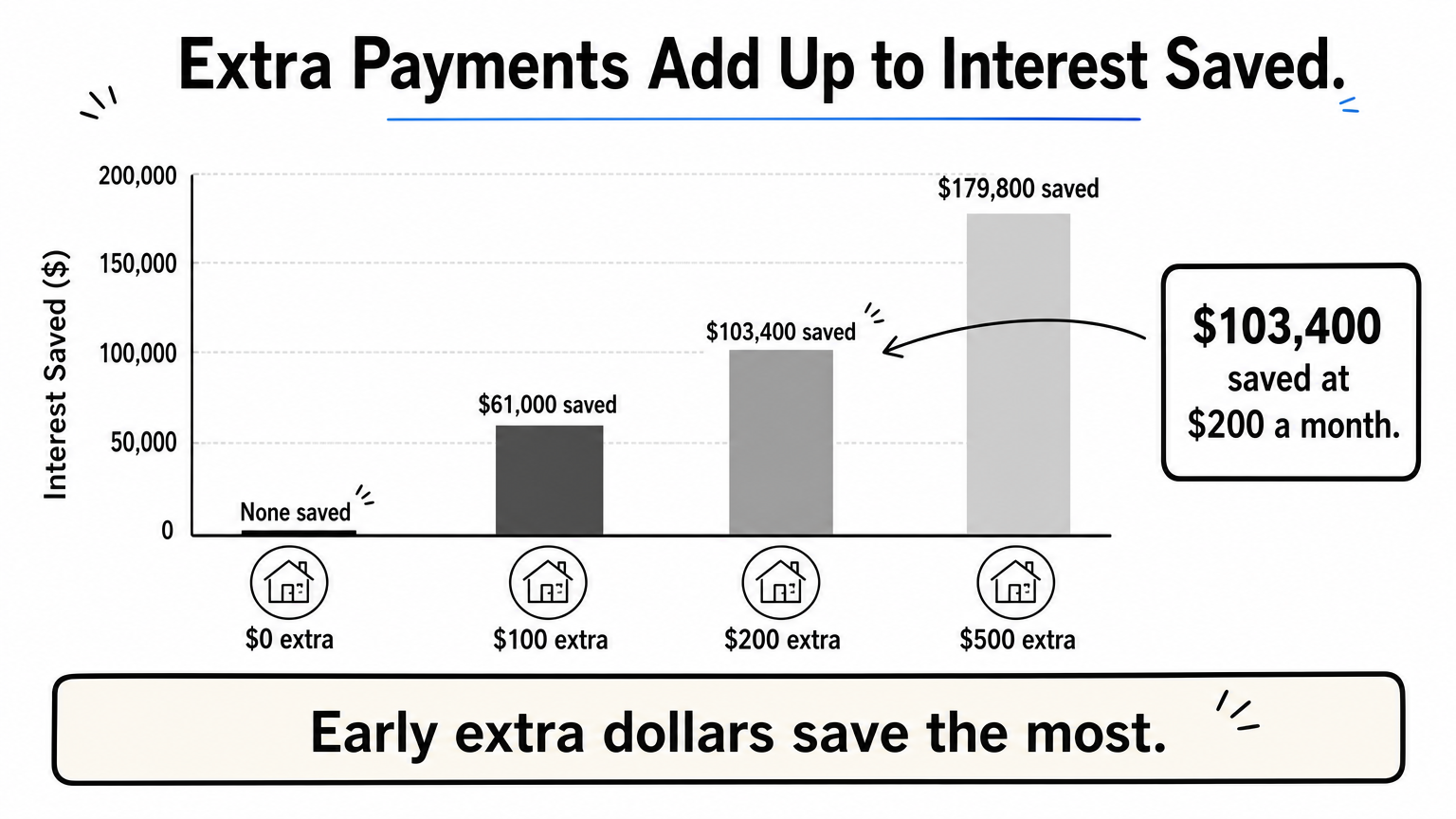
Here is a $300,000 balance at 6.5% on a 30-year schedule, with a base payment of $1,896. All figures are rounded.
| Extra per month | Total payment | Payoff time | Total interest | Interest saved |
|---|---|---|---|---|
| $0 | $1,896 | 30 years | $382,600 | None |
| $100 | $1,996 | About 26 years | $321,600 | $61,000 |
| $200 | $2,096 | About 23 years 1 month | $279,200 | $103,400 |
| $500 | $2,396 | About 17 years 6 months | $202,800 | $179,800 |
The first $100 saves about $61,000. The next $100 saves about $42,000 more. Each extra dollar still helps, but the gains per dollar shrink as the payoff date moves closer. The reason is that early extra dollars remove principal that would have accrued interest for decades.
Extra payments made early in the loan save the most, because they cut the longest stretch of interest.
Pay off a 30-year mortgage in 15 years
To finish a 30-year loan in 15 years, pay what a 15-year loan on the same balance would require. At 6.5%, that is about $2,613 a month on this loan, or roughly $717 more than the $1,896 base payment. Enter $717 as your monthly extra and confirm that the calculator shows 15 years.
If that gap is too large, aim for 20 years instead. Try $350 or so and see what the calculator says. A realistic plan you keep beats a perfect plan you abandon.
Step 4. Put your payoff plan into action
A projection only works if the money actually reaches your principal. Spend ten minutes on setup and you avoid the most common mistakes.
Direct the extra to principal
Tell your servicer that extra funds must be applied to principal only. Many online portals have a separate field for this. If you skip it, some servicers hold the money toward your next scheduled payment instead of reducing the balance. After the first extra payment, check your next statement and confirm the principal dropped by the extra amount.
Also ask whether your loan has a prepayment penalty. Many do not, but some limit how much you can prepay in a year. Your loan documents will say.
Recheck every year
Run the calculator again each year with your actual balance. Rounding, missed extras, and changes in income all move the payoff date. If your rate drops enough to refinance, compare the two paths using the Loan Comparison calculator or the refinance calculator.
What to do after the final payment
Once your balance reaches zero, you are not quite finished. Expect these steps:
- Receive a paid-in-full confirmation from your servicer.
- Make sure the lien is released and recorded. Your lender should handle this, but follow up if it does not arrive.
- Get any remaining escrow balance refunded.
- Keep paying property taxes and homeowners insurance directly, since they are no longer collected for you.
The loan is only truly paid off when the lien is released and you hold the paperwork.
Run your numbers and pick a payoff date
A payoff calculator turns a vague goal into a date. Gather your balance, rate, and principal and interest payment, enter a realistic extra amount, compare a few scenarios, and make sure your servicer applies the money to principal. On a $300,000 loan at 6.5%, $200 a month saves about $103,000 and cuts nearly seven years.
Treat every result as a planning estimate, since your lender's figures can differ slightly. When you are ready to test your own loan, open the free Extra Mortgage Payment Calculator, enter your balance, and see your payoff date in seconds.
This article is for general information and is not financial advice. Confirm figures with your lender or an official source before you decide.
Run your own numbers
Use our free calculators to see what this means for your loan.
More articles
- Amortization Schedule Payment Calculator: How to Use It
- Amortization Schedule for a Mortgage with a Balloon Payment
- Insurance and Mortgage: How PMI Works and What It Costs
- How Much Can I Afford on a House? 4 Steps to Your Number
- How Much House Can I Afford with a $100K Salary?
- How to Use a Mortgage Calculator to Estimate Your Payment
- Annual Amortization Calculator: Build a Yearly Schedule
- Oklahoma Mortgage Calculator: Add Taxes, Insurance and PMI
- Mortgage Term: What It Is and How to Pick the Right One
- How to Use an Amortisation Calculator and Read the Schedule