VA Loan Calculator: Find Your Payment and Home Budget
By Sohaib Ibrahim · Published October 31, 2026
The quickest way to use a VA loan calculator is to run it in two passes. First, set a monthly housing budget from your income and debts. Then enter a home price, down payment, interest rate and loan term, let the calculator add the VA funding fee, and add taxes, insurance and closing costs. Divide your budget by the cost per dollar of price, and you have your price range.
Most mortgage calculators are built for conventional loans. They add private mortgage insurance you will never pay, they ignore the funding fee you probably will pay, and they answer "what is my payment?" when you asked "how much house can I afford with a VA loan?" Those are different questions. Mixing them up leads buyers to fall for a house that strains the budget, or to aim too low.
This guide covers the process in four steps, with one worked example carried through all of them. HomeLoanCalc.io is a free set of calculators with no signup, and the steps use its VA Loan, Affordability, Mortgage and Closing Cost calculators. The results are planning estimates, not a quote, so your lender's final numbers will differ.
Why a VA loan needs its own calculator
A VA loan changes your math in three ways. It replaces monthly mortgage insurance with a one-time funding fee, it allows a 0% down payment, and your lender, not the VA, sets your rate and approval limits.

What changes with a VA loan
Here is what a VA-specific calculator accounts for that a generic one misses:
- No monthly mortgage insurance. VA loans have none, so any PMI line in your result is wrong.
- A funding fee. It runs from 1.25% to 3.30% of the loan, depending on your down payment and whether you have used the benefit before. You can finance it into the loan.
- Optional down payment. Most eligible borrowers can put down nothing, so the loan can equal the full price plus the fee.
- Eligibility. You need a Certificate of Eligibility (COE). Calculators assume you have one.
A VA loan swaps monthly mortgage insurance for a one-time funding fee, and your calculator has to treat them that way.
Payment calculator or affordability calculator
A payment calculator starts with a price and returns a monthly cost. An affordability calculator starts with your income and debts and returns a price. If you searched for a VA loan affordability calculator, this second kind is what you need first.
Use them in order. The Affordability Calculator sets your budget ceiling from income, monthly debt, down payment and credit score. The VA Loan Calculator then shows the true payment with the funding fee included.
Step 1. Set your monthly housing budget
Your budget is a share of gross monthly income, capped by your other debts. Decide this before you look at listings, because a price only means something against a monthly limit.
Start with gross monthly income
Divide your gross annual income by 12. The Affordability Calculator tests three shares of that figure: 22% for conservative, 28% for moderate and 33% for maximum.
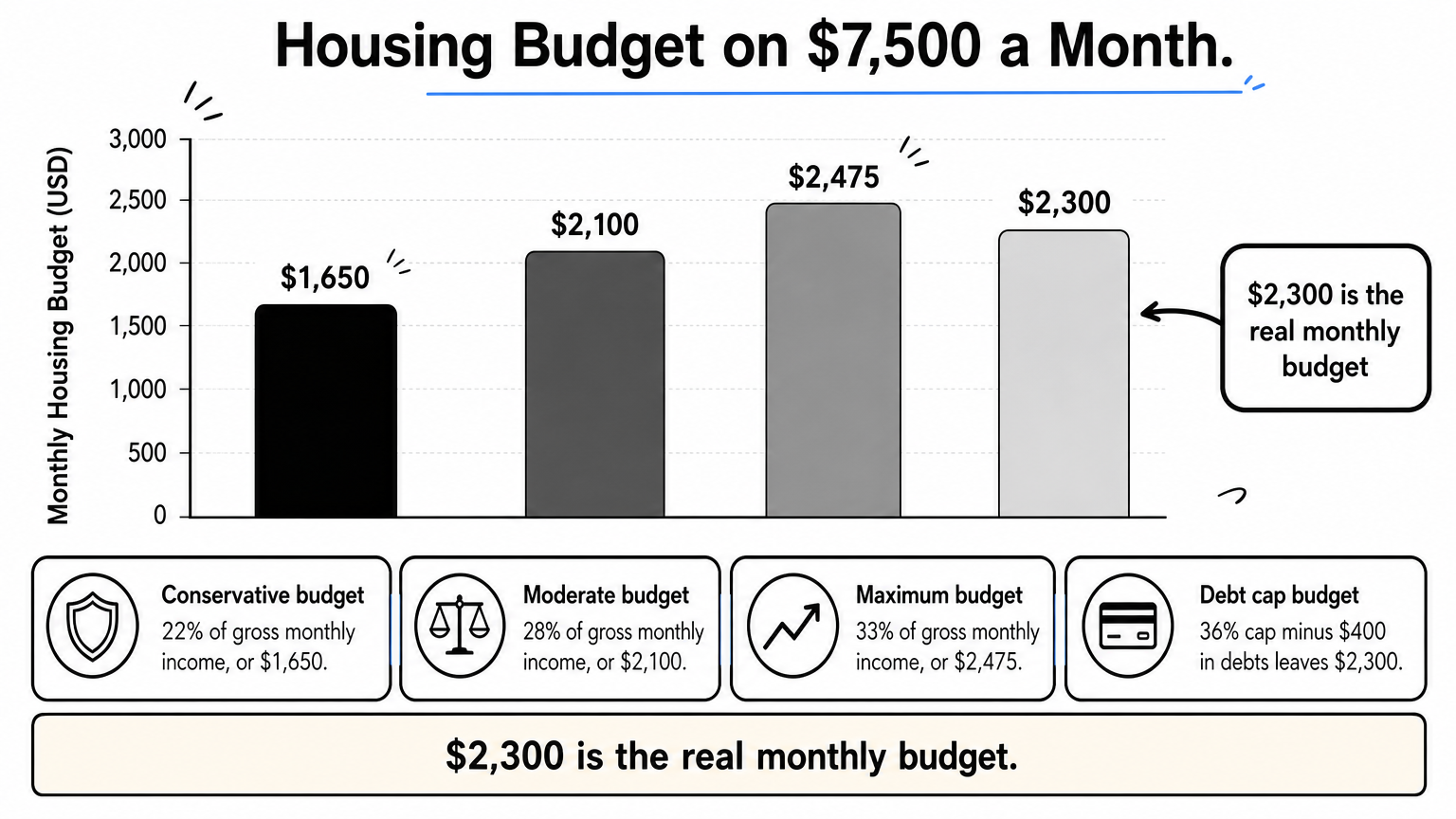
Say you earn $90,000 a year. That is $7,500 a month, which gives you these housing budgets:
- Conservative: $1,650
- Moderate: $2,100
- Maximum: $2,475
Apply the total debt cap
Housing plus existing monthly debts should stay near 36% of gross income. At $7,500, that is $2,700. If you pay $400 a month on a car loan and credit cards, housing tops out at $2,300. That is below the $2,475 maximum, so the debt cap wins.
Lenders look at this differently. VA lenders commonly use a debt-to-income benchmark of 41% and a residual income test, which measures the cash left each month after major expenses. A lender may approve more than the 36% cap allows. Treat the calculator's figure as a comfort number, not an approval ceiling.
Your real monthly budget is the lower of the percentage limit and the debt cap.
Step 2. Enter price, down payment, rate and term
Open the VA Loan Calculator and fill in four fields. Then check that it applies the right funding fee.
Fill in the four core fields
Use these inputs for the running example:
- Home price: $300,000
- Down payment: $0
- Interest rate: 6.5%, a placeholder. Use a rate quoted to you.
- Term: 30 years
Choose first use or repeat use of your benefit. If you have a VA disability rating of 10% or higher, received a Purple Heart, or are an eligible surviving spouse, tick the exemption box. The fee drops to zero.
Read the funding fee correctly
The fee depends on your down payment and your history with the benefit:
| Down payment | First use | Repeat use |
|---|---|---|
| Less than 5% | 2.15% | 3.30% |
| 5% to 9.99% | 1.50% | 1.50% |
| 10% or more | 1.25% | 1.25% |
On the $300,000 example with nothing down, the fee is $6,450. Financed, the loan becomes $306,450 and principal and interest come to about $1,937 a month. Without the fee it would be $1,896, so the fee adds roughly $41 a month.
Putting 5% down ($15,000) changes the picture. The fee falls to 1.50%, or $4,275, and the loan becomes $289,275. Principal and interest drop to about $1,828, roughly $109 a month less.
Even a small down payment cuts both the loan amount and the fee percentage.
Step 3. Add taxes, insurance, HOA and closing costs
The funding fee calculator result covers only principal and interest. Your real monthly payment and your cash at closing both need more lines.

Build the full monthly payment
Add property tax, homeowners insurance and any HOA dues to your principal and interest. The Mortgage Calculator has fields for each. Keep PMI out of the total, since VA loans carry none.
For the $300,000 example, I assume property tax of 1.1% of the price a year and insurance of $1,200 a year. Replace both with your local figures, because tax rates vary a lot by county.
| Line | Monthly |
|---|---|
| Principal and interest | $1,937 |
| Property tax | $275 |
| Homeowners insurance | $100 |
| HOA dues | $0 |
| Total | $2,312 |
Compare that with the $2,300 cap from Step 1. This house sits right at your limit, with no room to spare.
Budget cash for closing costs
The Closing Cost Calculator takes your home price, country, down payment percentage and loan type, then breaks out the usual fees. On $300,000, the listed items add up to 2.2%, or $6,600:
| Fee | Share of price | Amount |
|---|---|---|
| Loan origination | 1% | $3,000 |
| Title insurance | 0.5% | $1,500 |
| Recording and transfer | 0.3% | $900 |
| Attorney or legal | 0.2% | $600 |
| Appraisal | 0.1% | $300 |
| Inspection | 0.1% | $300 |
The funding fee is separate, and you can finance it. Sellers can also contribute up to 4% of the home's established value toward certain closing costs, so ask your agent to negotiate.
Count closing costs as cash you need on day one, separate from your monthly payment.
Step 4. Work backward to the house you can afford
Now turn your monthly budget into a price range. This answers how much house you can afford with a VA loan and roughly how much you qualify for.
Turn your budget into a price
At 6.5%, no down payment, first-use funding fee, 1.1% tax and 0.4% insurance, each $1,000 of price costs about $7.71 a month. Divide your budget by 7.71 and multiply by 1,000.
| Scenario | Monthly budget | Approximate price |
|---|---|---|
| Conservative (22%) | $1,650 | $214,000 |
| Moderate (28%) | $2,100 | $272,500 |
| Maximum, capped by debts | $2,300 | $298,500 |
The $300,000 home from Step 3 fits only at the debt cap. For the $90,000 earner with $400 in monthly debts, the moderate row is the comfortable target.
Test the result and confirm with a lender
Stress the numbers before you trust them. Raise the rate to 7%, and the payment on the $306,450 loan rises by about $100 a month. If that breaks your budget, aim lower.
Then talk to a lender. The VA sets no minimum credit score, but lenders do, and they set your rate and final approval. Your lender's pre-approval is the real answer to how much you qualify for. The calculator tells you what to ask for.
Run your numbers before you shop
A VA loan calculator works best as a two-pass tool. Set a budget from income and debts, then price the loan with the funding fee, taxes, insurance and closing costs included. Work backward from the monthly figure you can live with, and the price range follows.
Remember the main levers. A down payment of 5% or more lowers the fee, an exemption removes it, and the lower of your percentage limit and debt cap sets your ceiling. Keep every result as a planning estimate until a lender confirms it.
You can try this with your own income and rate in the free VA Loan Calculator at HomeLoanCalc.io. It needs no signup and no email, so you can test as many price and down payment combinations as you like.
This article is for general information and is not financial advice. Confirm figures with your lender or an official source before you decide.
Run your own numbers
Use our free calculators to see what this means for your loan.
More articles
- Mortgage Insurance on FHA: What It Is and What It Costs
- How Much House Can I Afford on 80K Salary? Real Numbers
- Mortgage Refinance Calculator: How to Find Your Break-Even
- Primary Mortgage Insurance: What PMI Is, Costs and Removal
- Extra Mortgage Payments: How They Work and What You Save
- How to Use a Pay Down Loan Calculator to Save Interest
- How to Use an Amortisation Calculator and Read the Schedule
- Down Payment on 200k House: What You Need by Loan Type
- Oklahoma Mortgage Calculator: Add Taxes, Insurance and PMI
- How to Calculate PMI on a Conventional Loan, Step by Step