Mortgage Refinance Calculator: How to Find Your Break-Even
By Sohaib Ibrahim · Published October 29, 2026
Use a refinance calculator mortgage tool in four steps. Enter your current balance, rate and remaining term. Enter the new rate, term and closing costs. Read the monthly savings. Then divide closing costs by those savings to get your break-even point. If you will keep the home longer than that, refinancing pays off.
The hard part is that a lower rate looks like a win before you count the cost. Refinancing usually runs 2% to 5% of the new loan in closing costs, and a fresh 30-year term can add years of payments. Many calculators also ask for your email or phone number before they show a result. That is a lot of friction for a rough answer.
This guide walks through each step with one worked example on a $250,000 balance. It also covers how to adjust the numbers for an FHA loan, a cash-out refinance, or a home outside the US. HomeLoanCalc.io's refinance calculator is free, needs no signup, and updates as you type, so you can follow along.
Why a refinance calculator beats a rate quote
A refinance calculator compares your current loan to a proposed one and shows three things: monthly savings, total interest saved, and the months it takes to recover your closing costs. A lender's rate quote shows none of that, because it only tells you what the new loan costs, not whether the swap makes sense.
What the calculator measures
Every useful refinance calculator should return the same core results. Check that yours does before you trust it.
- Monthly savings: your current payment minus the new one.
- Break-even point: closing costs divided by monthly savings, in months.
- Total interest saved: interest on the old loan minus interest on the new one over the full term.
- New monthly payment: the amount you would actually pay going forward.
The break-even point, not the new rate, is the number that decides whether you refinance.
What it cannot tell you
A calculator gives a planning estimate, not a binding quote. Your final rate, taxes and insurance premiums come from the actual lender and your local assessor, so the real payment can differ slightly.
That is still enough to decide whether to start shopping. Treat the result as a filter. If the numbers look weak here, a formal quote will not rescue them.
Step 1. Enter your current loan
Start with what you owe today, not what you borrowed. The calculator needs your remaining balance, your current interest rate and the months left on the loan.
Find your three current numbers
Pull up your latest mortgage statement and copy these:
- Remaining balance: the principal still owed or the payoff amount, not the original loan amount.
- Current rate: the interest rate on the statement, to two or three decimals.
- Remaining term: months left, not the original term. A 30-year loan you took out seven years ago has 23 years left.
If you cannot find the balance, an amortization calculator will rebuild it from the original loan, rate and age of the loan.
Use principal and interest only
Compare principal and interest on both sides. Property taxes and homeowners insurance usually stay the same after a refinance, so adding them to both loans only clutters the comparison.
Home value matters for one reason. Lenders price your loan by loan-to-value ratio. You do not need 20% equity to refinance, but with less than 20% on a conventional loan you will likely pay PMI. FHA and VA refinances accept less equity.
Step 2. Enter the new loan and closing costs
The new loan needs three inputs: a rate, a term and a cost. Use real quotes where you can, because a guessed rate produces a guessed answer.
Pick the new rate and term
Take the rate from a lender's loan estimate, or use a conservative number in the middle of what you have seen. Then choose the term deliberately. Refinancing a loan with 23 years left into a new 30-year term lowers your payment partly by stretching it out, which flatters the savings and adds years of interest.
To avoid that trap, set the new term close to your remaining term. If you are weighing a 15-year loan against a 30-year loan, run both through the mortgage comparison calculator.
Set closing costs honestly
Closing costs typically run 2% to 5% of the new loan amount. On a $250,000 refinance, that is $5,000 to $12,500. Use 3% if you have no quote. Origination, appraisal, title insurance and recording fees make up most of the total, and discount points add to it if you buy a lower rate.
You can pay these costs up front or roll them into the loan. Rolling in keeps cash in your pocket but raises the balance. On a $250,000 loan at 6%, adding $7,500 of costs lifts the payment from about $1,498.88 to $1,543.84.
Enter closing costs as a real dollar figure, and never as zero, or your break-even point will look better than it is.
Step 3. Read your savings and break-even point
Divide closing costs by monthly savings to get your break-even in months. If you will own the home longer than that, the refinance pays for itself. Here is a worked example with a 1-point rate drop.
Work through an example
Assume a $250,000 balance, a current 7.00% rate, a new 6.00% rate, 30 years on both loans, and 3% closing costs.
| Current loan | Refinanced loan | |
|---|---|---|
| Balance | $250,000 | $250,000 |
| Rate | 7.00% | 6.00% |
| Monthly principal and interest | $1,663.26 | $1,498.88 |
| Monthly savings | $164.38 | |
| Annual savings | $1,972.56 | |
| Closing costs (3%) | $7,500 | |
| Break-even | about 46 months |
Break-even is $7,500 divided by $164.38, or roughly 3.8 years. If both loans ran their full 30 years, interest would fall by about $59,000 before closing costs. Your own figure will differ because your current loan has already paid down.
Test the result against your plans
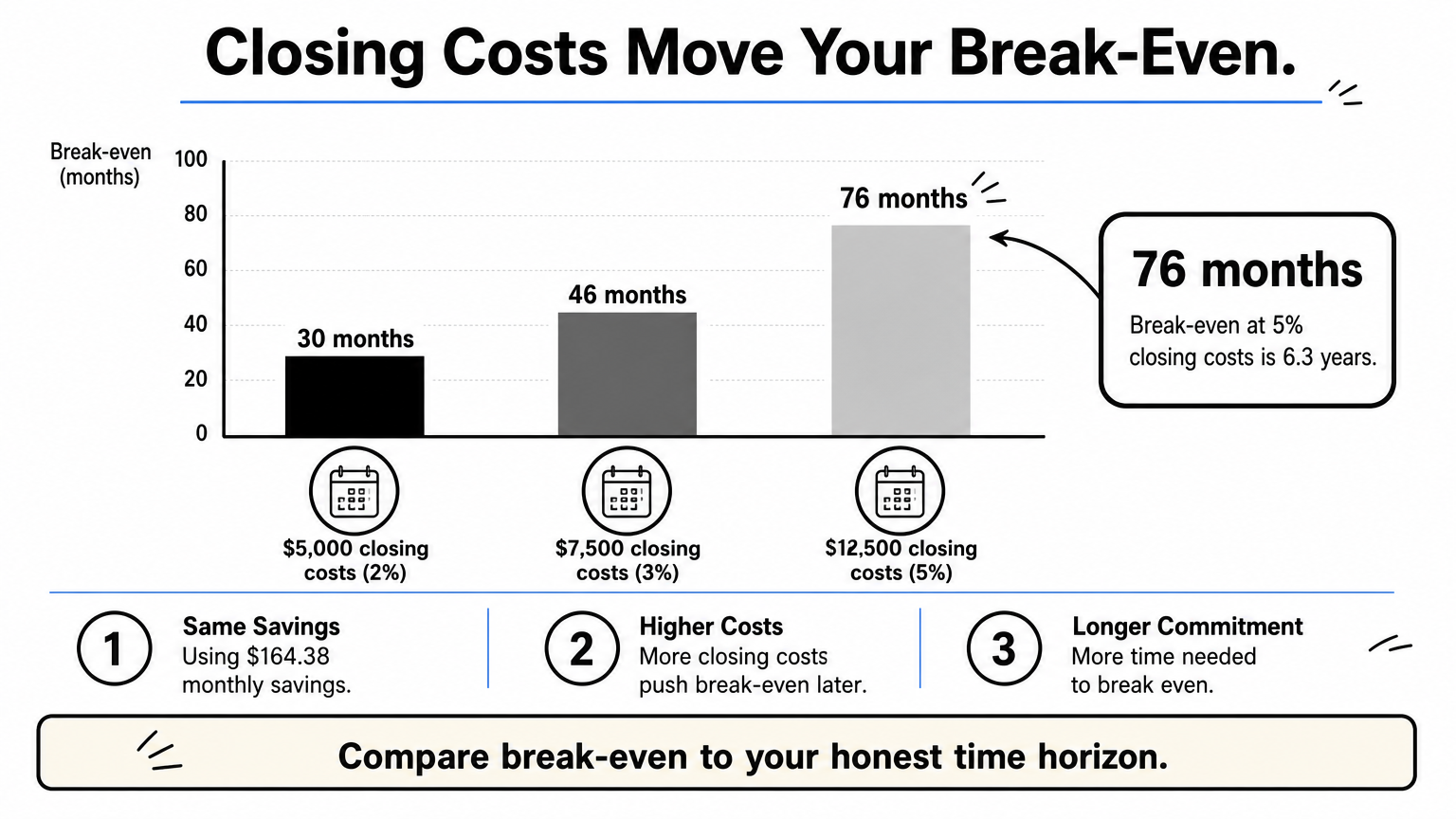
Closing costs move the break-even a lot, even when the rate stays the same.
| Closing costs | Share of loan | Break-even |
|---|---|---|
| $5,000 | 2% | 30 months (2.5 years) |
| $7,500 | 3% | 46 months (3.8 years) |
| $12,500 | 5% | 76 months (6.3 years) |
This also answers the common rate-drop questions. Rules of thumb range from 0.75 to 2 percentage points, but they are shortcuts. A 1-point drop was worth it in the example for anyone staying four years or more, and not worth it for someone moving in two. Compare break-even to your honest time horizon, then decide.
Step 4. Adjust for FHA, cash-out or your country
The standard calculator assumes a fixed-rate loan with no extras. Three common cases need a small adjustment before you trust the output.
FHA refinance
For an FHA refinance, add mortgage insurance to the new payment. The upfront premium is usually 1.75% of the base loan and is often financed into the balance. The annual premium is commonly 0.55% a year on most 30-year loans, paid monthly. The FHA loan calculator estimates both, so add its monthly figure to the refinanced payment before you compare.
Cash-out refinance
For a cash-out refinance, enter the new balance as your current balance plus the cash you take. Your payment will probably rise, so the calculator may show negative savings. That is expected, since the goal here is cash, not a lower bill. FHA cash-out loans generally cap the new balance at 80% of the home's value, so check that limit first.

Outside the United States
Choose your country in the calculator and it loads the local currency and typical rates, including PKR for Pakistan. Every default can be changed. Islamic home financing such as Diminishing Musharakah uses different contracts, but the same amortization math gives a close approximation of the monthly outflow.
Adjust the inputs to match your loan type first, because a correct calculation of the wrong loan is still wrong.
Run the numbers before you call a lender
A refinance is worth it when your break-even point is shorter than the time you will keep the home. Enter your remaining balance, rate and term, add realistic closing costs, check the term reset, and adjust for FHA insurance or cash-out if they apply.
Do this before you apply, then confirm with quotes from at least three lenders. When you are ready, try HomeLoanCalc.io's free refinance calculator, which needs no signup and shows your savings and break-even as you type.
This article is for general information and is not financial advice. Confirm figures with your lender or an official source before you decide.
Run your own numbers
Use our free calculators to see what this means for your loan.
More articles
- Extra Mortgage Payments: How They Work and What You Save
- Mortgage Insurance on FHA: What It Is and What It Costs
- How to Use an Amortisation Calculator and Read the Schedule
- VA Loan Calculator: Find Your Payment and Home Budget
- Oklahoma Mortgage Calculator: Add Taxes, Insurance and PMI
- How Much House Can I Afford on 80K Salary? Real Numbers
- How to Use a Mortgage Calculator to Estimate Your Payment
- Primary Mortgage Insurance: What PMI Is, Costs and Removal
- How Much Can I Afford on a House? 4 Steps to Your Number
- How to Use a Pay Down Loan Calculator to Save Interest