Annual Amortization Calculator: Build a Yearly Schedule
By Sohaib Ibrahim · Published November 18, 2026
The quickest way to use an annual amortization calculator is to enter the loan amount, the yearly interest rate and the term in years, find the one yearly payment with the formula payment = P × r ÷ (1 − (1 + r)^−n), and then split each payment into interest on the opening balance and principal. You can do it in a spreadsheet in about five minutes. The result is a table with one row per year showing the payment, interest, principal and remaining balance.
Most online tools assume you pay monthly. If your loan is paid once a year, as many farm, land and private loans are, a monthly tool understates your interest. A yearly loan lets interest build on the full balance for twelve months before you repay anything, and on a $100,000 loan that gap is worth thousands of dollars.
This guide covers four steps and carries one example through all of them: $100,000 at 6% over five years. You get the formula, a spreadsheet setup you can copy, the full yearly table, and a way to cross-check your numbers with the free Amortization Calculator at HomeLoanCalc.io.
Why annual payments change the amortization math
An annual amortization schedule lists one payment per year and shows how much of each payment pays interest and how much reduces the balance. Because you pay only once a year, interest accrues on the whole balance for twelve months before any principal comes off.
How yearly and monthly schedules differ
Take $100,000 at 6% over five years. Paid yearly, the payment is $23,739.64 once a year. Paid monthly at the same nominal rate, it is $1,933.28 sixty times. The yearly loan costs more in total because your balance falls only five times instead of sixty.
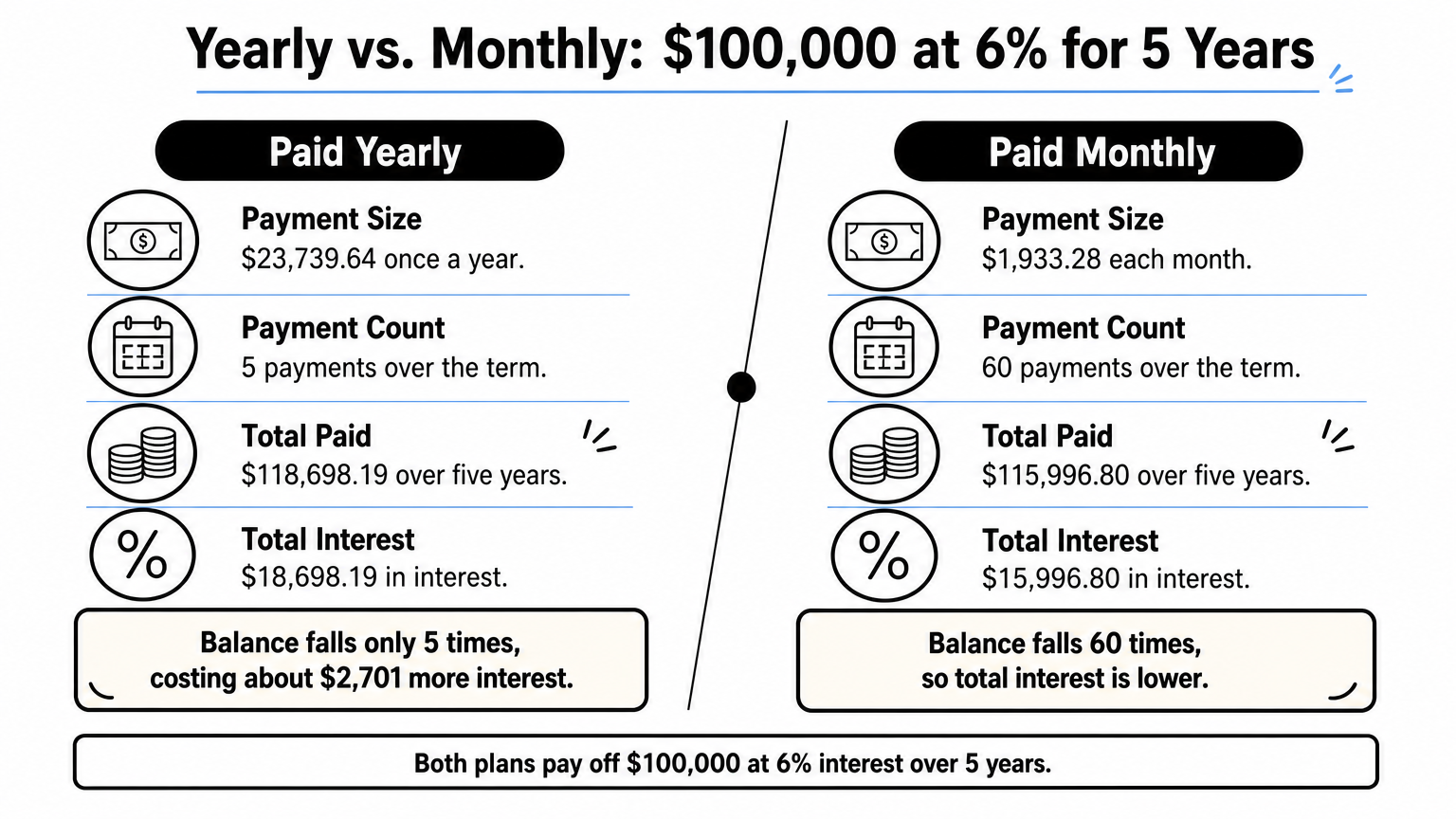
| Payment frequency | Payment | Number of payments | Total paid | Total interest |
|---|---|---|---|---|
| Annual | $23,739.64 | 5 | $118,698.19 | $18,698.19 |
| Monthly | $1,933.28 | 60 | $115,996.80 | $15,996.80 |
The yearly schedule costs about $2,701 more in interest on this loan.
Paying once a year costs more interest than paying monthly, because the balance sits untouched for twelve months at a time.
When you need a yearly schedule
Reach for a yearly schedule when your loan agreement says "annual installment." That is common on farm and land loans, equipment financing, family loans and some business loans. Most home mortgages are paid monthly, so for those you are better off with a monthly calculator.
Step 1. Gather four loan inputs
You need four numbers from your loan agreement or term sheet before you calculate anything. Pull them out first so you do not guess halfway through.

The four numbers
- Loan amount. The amount you actually borrow, after any down payment. In our example, $100,000.
- Annual interest rate. The nominal yearly rate on the agreement. In our example, 6%.
- Term in years. The number of yearly payments. In our example, 5.
- Payment timing. Whether the first payment falls one year after the loan starts. This guide assumes payments at the end of each year.
Convert the rate if your lender compounds monthly
Some lenders quote a yearly rate that compounds monthly even though you pay once a year. In that case the rate you plug into the yearly formula is the effective annual rate: (1 + rate ÷ 12)^12 − 1. For a 6% rate compounded monthly, that comes to about 6.17%. If your agreement compounds yearly, use the stated rate as it is. The loan documents say which one applies, and if they do not, ask the lender before you build the schedule.
Use the rate that matches how interest compounds, not just the rate printed on the first page.
Step 2. Calculate the annual payment
The annual payment is the fixed amount that repays the loan in full over the term, and one formula gives it. Everything in the schedule builds on this single number.
The formula
Use this, where P is the loan amount, r is the yearly rate as a decimal and n is the number of years:
Payment = P × r ÷ (1 − (1 + r)^−n)
For our loan: 100,000 × 0.06 ÷ (1 − 1.06^−5) = 6,000 ÷ 0.252742 = $23,739.64. This is the standard fixed-rate amortization formula that lenders use, applied with one period per year.
The spreadsheet shortcut
Excel and Google Sheets do the same math with PMT. Put this in any cell:
=PMT(0.06, 5, -100000)
The negative sign on the loan amount makes the result positive. If you see a negative payment, the signs are the only problem. Change the three numbers to match your own loan.
One PMT cell or one formula gives you the payment, and every other number in the schedule follows from it.
Step 3. Build the yearly amortization schedule
Build the schedule by repeating three calculations for each year, using the previous year's closing balance as the new opening balance. Interest comes first, and principal is whatever is left of the payment.
The three rules per row
- Interest = opening balance × yearly rate.
- Principal = payment − interest.
- Closing balance = opening balance − principal.
Applying them to our loan gives this yearly amortization schedule:
| Year | Payment | Interest | Principal | Closing balance |
|---|---|---|---|---|
| 1 | $23,739.64 | $6,000.00 | $17,739.64 | $82,260.36 |
| 2 | $23,739.64 | $4,935.62 | $18,804.02 | $63,456.34 |
| 3 | $23,739.64 | $3,807.38 | $19,932.26 | $43,524.08 |
| 4 | $23,739.64 | $2,611.44 | $21,128.20 | $22,395.88 |
| 5 | $23,739.63 | $1,343.75 | $22,395.88 | $0.00 |
In year 1, about 25% of your payment is interest. By year 5, it is under 6%. The last payment is a cent lower because of rounding, which is normal.
Set it up in a spreadsheet
Use columns for year, opening balance, payment, interest, principal and closing balance. Enter these formulas in rows 2 and 3, then fill row 3 down to your final year:
A2: 1
B2: 100000
C2: =PMT(0.06,5,-100000)
D2: =B2*0.06
E2: =C2-D2
F2: =B2-E2

A3: =A2+1
B3: =F2
C3: =C2
D3: =B3*0.06
E3: =C3-D3
F3: =B3-E3
Swap 0.06, 5 and 100000 for your own rate, term and loan amount.
Every row of a yearly schedule uses the same payment, so only the interest and principal split changes from year to year.
Step 4. Check the schedule and compare it
Check your work before you rely on the table. Three quick tests catch almost every error, and a second calculator shows what the same loan would cost if you paid monthly.
Three checks that catch errors
- The principal column adds up to the loan amount. Here, $100,000.00.
- The closing balance in the last year is zero, give or take a few cents of rounding.
- Total interest equals total payments minus the loan amount. Here, $118,698.19 − $100,000 = $18,698.19.
If the balance never reaches zero, the usual cause is a rate typed as 6 instead of 0.06, or a term that does not match your payment count.
Cross-check with HomeLoanCalc.io
The Amortization Calculator at HomeLoanCalc.io takes the loan amount, annual interest rate and term in years, then returns the payment, total interest and total cost. You can switch the schedule between an annual summary and a detailed monthly view. It models monthly payments, so it will not reproduce a once-a-year payment. Use it to see what your loan would cost on a monthly schedule. For our example, it should show about $1,933.28 a month and roughly $16,000 of total interest.
If your lender lets you choose, that comparison tells you whether switching to monthly payments is worth asking about. To test paying extra principal, the Extra Mortgage Payment Calculator shows time and interest saved. In a yearly schedule the same logic holds: any extra amount lowers next year's opening balance, which lowers next year's interest. Treat every result as a planning estimate. The lender's own figures decide what you actually owe.
A yearly schedule is correct when the principal adds up, the balance ends at zero, and the interest total matches.
Your yearly schedule in short
To build an annual amortization schedule, gather the loan amount, rate and term, calculate one payment with the formula or PMT, then fill in interest, principal and balance for each year. Check that principal adds up to the loan and the balance ends at zero. Paying once a year costs more interest than paying monthly, so run both versions before you commit.
For a quick second opinion on the monthly side, try the free HomeLoanCalc.io Amortization Calculator. It needs no signup, and you can switch between an annual summary and a monthly view.
This article is for general information and is not financial advice. Confirm figures with your lender or an official source before you decide.
Run your own numbers
Use our free calculators to see what this means for your loan.
More articles
- Mortgage Term: What It Is and How to Pick the Right One
- How Much House Can I Afford with a $100K Salary?
- How Much to Afford a 500K House: Income and Down Payment
- Insurance and Mortgage: How PMI Works and What It Costs
- Mortgage Calculator with Tax and Insurance: How to Use It
- Amortization Schedule Payment Calculator: How to Use It
- Mortgage Insurance Disbursement: What the Line Item Means
- Mortgage Paid Off Calculator: How to Find Your Payoff Date
- How Much House Can I Afford with 70K Salary? $170K to $305K
- Amortization Schedule for a Mortgage with a Balloon Payment