How to Use an Amortisation Calculator and Read the Schedule
By Sohaib Ibrahim · Published October 27, 2026
To use an amortisation calculator, enter your loan amount, annual interest rate and term in years. The tool returns a fixed monthly payment and a schedule that splits every payment into principal and interest. Then you test extra payments to see how much sooner you could be debt-free. On a $250,000 loan at 6.5% over 30 years, this takes about a minute and reveals $318,861 of interest that the monthly payment hides.
Most borrowers know their payment and little else. The payment never changes, but what it does changes every month. Early payments are mostly interest, so the balance barely moves for years. That is why people who sell or refinance after five years are often shocked at how little they have paid down.
This guide walks you through four steps with one worked example. You will gather the right inputs, enter them in the free amortization calculator on HomeLoanCalc.io, read the schedule row by row, and test extra payments. There is no signup and no email, and it works in any currency.
Why you need an amortization schedule
An amortization schedule is a table that shows how each payment on a fixed-rate loan divides between interest and principal, and what you still owe afterward. Seeing that split before you sign tells you the true cost of the loan, which the monthly payment alone cannot do.
What amortization means for your loan
A 30-year amortization means the loan is scheduled to reach a zero balance after 360 equal monthly payments. Each payment first covers the interest that accrued since the last payment. Whatever is left reduces the principal.
The fixed payment comes from the standard formula that banks and lenders use, and the HomeLoanCalc.io calculators run on it:
M = P × r(1 + r)^n / ((1 + r)^n - 1)

M = monthly payment
P = loan amount
r = annual rate ÷ 12
n = years × 12
Why early payments are mostly interest
Interest is charged on the balance you still owe, so it is highest on day one and shrinks as the balance falls. Take our example loan of $250,000 at 6.5% over 30 years. In the first payment, $1,354.17 goes to interest and only $226.00 goes to principal. The principal share grows every month by the same amount the interest share shrinks, which keeps the total level.
Every payment is the same size, but the first ones are almost all interest.
Step 1. Gather your loan amount, rate and term
You need three numbers: the loan amount, the annual interest rate and the term in years. Everything else the calculator produces comes from these inputs.

Enter the loan amount, not the home price
For a mortgage, the loan amount is the price minus your down payment. A $312,500 home with 20% down gives a $250,000 loan. Take the rate from your lender's quote or preapproval, and enter it as an annual percentage.
- Loan amount: $250,000
- Annual interest rate: 6.5%
- Loan term: 30 years
Pick the calculator that fits the loan
The Amortization Calculator on HomeLoanCalc.io covers principal and interest only. A real mortgage payment usually adds property tax, insurance, PMI and HOA fees. If you want those included, use the mortgage payment calculator instead. It also produces a full schedule and loads defaults for Pakistan, India, the UK, Canada or the USA.
Remember that these calculators model fixed-rate loans. Adjustable-rate loans re-cut the schedule at each reset, so a schedule for one is only valid until the next adjustment. Interest-only and balloon loans also break the standard pattern, and credit cards do not amortize at all.
If your loan has a fixed rate and equal payments, a standard amortization schedule fits it.
Step 2. Enter the numbers and check the payment
Type the three inputs into the amortisation calculator and the monthly payment appears as you type. There are no multi-step forms to click through.
Enter the example loan
Here is what the example loan returns:
| Input or result | Value |
|---|---|
| Loan amount | $250,000 |
| Interest rate | 6.5% |
| Term | 30 years |
| Monthly payment | $1,580.17 |
| Total interest | $318,861 |
| Total cost | $568,861 |
The loan amount scales the results in proportion. A $500,000 loan at the same rate and term has a payment of $3,160.34 and total interest of $637,722. That is double the interest on the $250,000 loan.
Verify the payment in a spreadsheet
You can double-check any result in Excel or Google Sheets with the PMT function:
=PMT(6.5%/12, 360, -250000)
It returns 1,580.17. Treat the result as a planning estimate, not a binding quote. Your lender's actual payment can differ slightly because the final rate, taxes and insurance premiums come from the lender and your local assessor.
A payment you can reproduce in a spreadsheet is a payment you can trust.
Step 3. Read the amortization schedule
Read the schedule one row at a time, looking at the interest, the principal and the ending balance. Start with the annual view for the big picture, then switch to the monthly view for detail.

Switch between annual and monthly views
The calculator lets you toggle between an annual summary and a detailed monthly view. The annual view shows how many years it takes for the balance to fall by half. The monthly view shows the exact split of each payment, like this excerpt for the example loan:
| Payment | Interest | Principal | Ending balance |
|---|---|---|---|
| 1 | $1,354.17 | $226.00 | $249,774.00 |
| 2 | $1,352.94 | $227.23 | $249,546.77 |
| 233 | $788.75 | $791.42 | $144,824.47 |
| 360 | $8.51 | $1,571.66 | $0.00 |
Three things to look for
First, the payment never changes. Interest plus principal always equals $1,580.17. Second, principal overtakes interest at payment 233, more than 19 years in. Even then you still owe about $144,800, well over half the original loan.
Third, look at year one. You pay $18,962 but reduce the balance by only about $2,794. This is why selling or refinancing early disappoints. Your equity is much smaller than the share of the term you have completed, and a refinance restarts the schedule at month one, when interest is at its peak.
The share of payments you have made is always bigger than the share of the loan you have repaid.
Step 4. Test the effect of extra payments
Paying extra on your mortgage sends money straight to principal, which shrinks the balance that all future interest is charged on. Even small amounts have an outsized effect over 30 years.
What extra money saves on the example loan
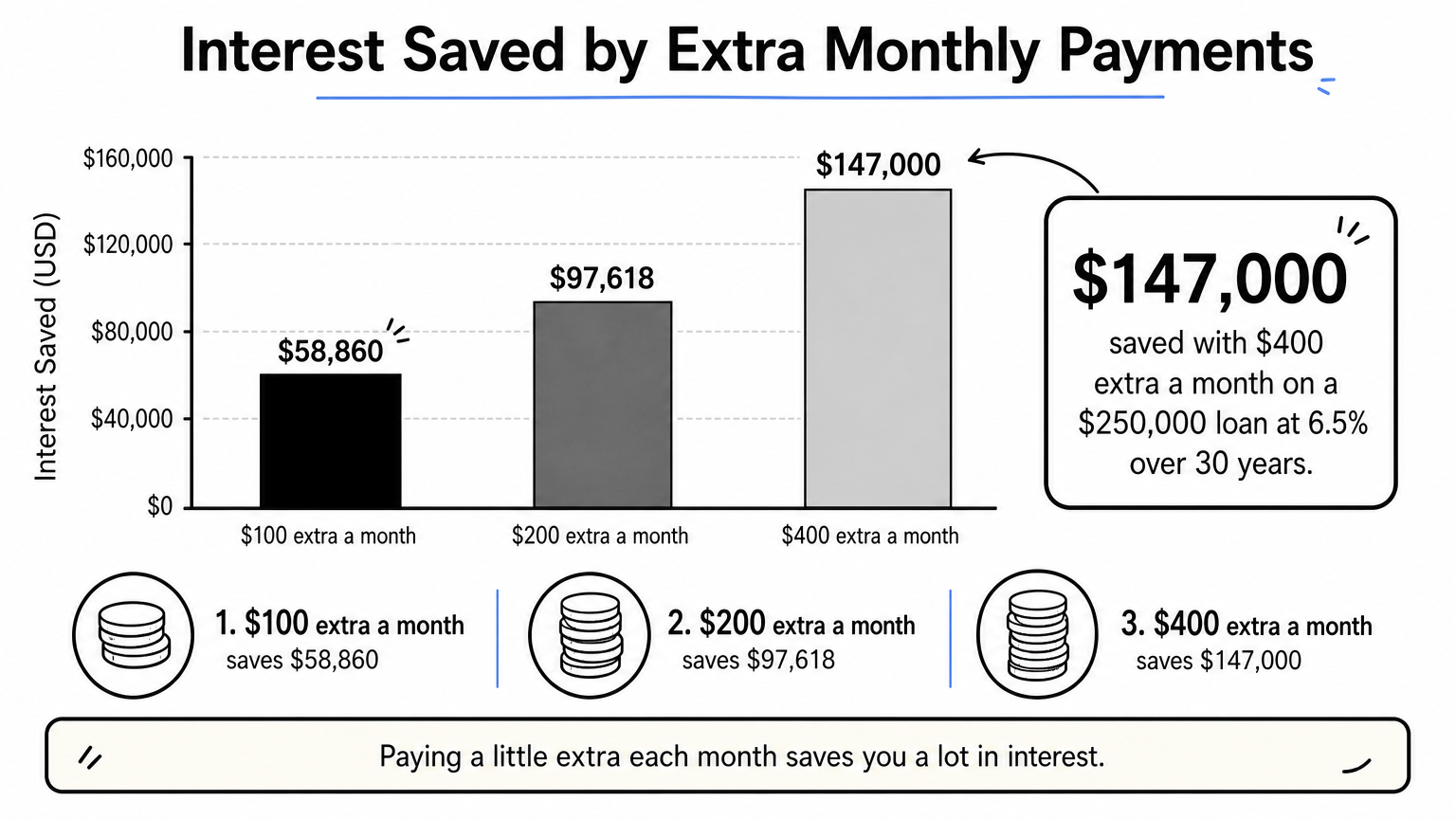
Here is the effect of adding a fixed amount to every monthly payment on the $250,000 loan at 6.5%:
| Extra per month | Payments needed | Time saved | Interest saved |
|---|---|---|---|
| $0 | 360 | None | $0 |
| $100 | 304 | 4 years 8 months | $58,860 |
| $200 | 265 | 7 years 11 months | $97,618 |
| $400 | 214 | 12 years 2 months | About $147,000 |
Paying an extra $400 a month on a 30-year mortgage is therefore worth roughly 12 years and $147,000 on this loan. Your own figures depend on your balance, rate and remaining term.
Run your own extra payment scenario
Use the extra payment calculator for your numbers. Enter your current loan balance, add a monthly extra or a one-time lump sum, and compare your original payoff with the accelerated one on two side-by-side balance charts.
Before you commit, check your loan agreement for prepayment penalties. They are rare on mortgages but more common on some auto and personal loans. Then tell your servicer in writing that the extra money must be applied to principal, not held as an early installment of your next payment.
Always confirm in writing that extra payments are applied to principal.
Run your own numbers
An amortization schedule turns a single monthly payment into a clear picture of what a loan really costs. You enter three numbers, check the payment, read how interest gives way to principal, and see what extra payments change. On the example loan, that picture runs from a $1,580.17 payment to $318,861 of interest, and from a 30-year term down to 17 years with an extra $400 a month.
The same four steps work for your own mortgage or loan. Open the free amortization schedule calculator at HomeLoanCalc.io, enter your loan amount, rate and term, and see your full schedule in seconds. Treat the results as planning estimates and confirm final figures with your lender.
This article is for general information and is not financial advice. Confirm figures with your lender or an official source before you decide.
Run your own numbers
Use our free calculators to see what this means for your loan.
More articles
- Oklahoma Mortgage Calculator: Add Taxes, Insurance and PMI
- Extra Mortgage Payments: How They Work and What You Save
- How to Use a Mortgage Calculator to Estimate Your Payment
- Mortgage Refinance Calculator: How to Find Your Break-Even
- How Much Can I Afford on a House? 4 Steps to Your Number
- Mortgage Insurance on FHA: What It Is and What It Costs
- Amortization Schedule for a Mortgage with a Balloon Payment
- VA Loan Calculator: Find Your Payment and Home Budget
- Mortgage Paid Off Calculator: How to Find Your Payoff Date
- How Much House Can I Afford on 80K Salary? Real Numbers